20 Aug
A SKU is one of those ecommerce terms that most people encounter every day without giving it much thought.
Stock Keeping Unit.
Just a string of letters and numbers attached to a product.
But when you are selling across multiple marketplaces, that seemingly simple string can become one of the most important connections in your entire operation.
Because when your marketplace SKU and your ecommerce platform’s SKU don’t correspond, your systems need another way to understand that they are talking about the same product.
And when that connection is missing, automation can quickly start to break down.
The humble SKU has a big job
In a single-channel ecommerce operation, it can be easy to overlook the importance of a consistent product identifier. Your online store knows which product is which, your stock is held in one place and your orders arrive in the same system.
Start selling on Amazon, Argos, eBay, Wayfair or other marketplaces, however, and the picture becomes considerably more complicated.
Your product now exists in multiple environments.
The marketplace has its own listing. Your ecommerce platform has its own product record. Your ERP or inventory system may have another identifier. And somewhere in the middle, your integration needs to understand how all of those records relate to one another.
That is where the SKU becomes particularly important.
When marketplace SKUs don’t match
So, what happens when the SKU on a marketplace doesn’t match the SKU in your ecommerce platform?
It happens more often than you might think.
A marketplace listing may have been created years ago, before the merchant’s current ecommerce platform was even in place. A catalogue might have been imported from another system, uploaded using a spreadsheet, or managed by different teams using different conventions. Sometimes the marketplace SKU simply follows a completely different naming structure.
None of these situations are necessarily a problem in themselves.
ChannelUnity uses SKUs to uniquely identify products when working with marketplace listings. For example, where an ecommerce platform does not provide a suitable SKU, or the merchant doesn’t use SKUs in their ecommerce platform, ChannelUnity can generate a unique SKU for products and variants.
The important thing is that there is a way to connect the marketplace listing to the correct product in the merchant’s system.
Different SKUs don’t have to mean disconnected products
It’s tempting to think that the answer is simply to make every SKU match.
But for an established multichannel business, that isn’t always practical.
A merchant could have thousands of live marketplace listings, each with its own existing SKU. Changing those values just to bring them into line with an ecommerce platform could create a significant amount of unnecessary work — and potentially disrupt existing marketplace data.
The important thing isn’t that the SKU values are identical.
It’s that there is a clear relationship between them.
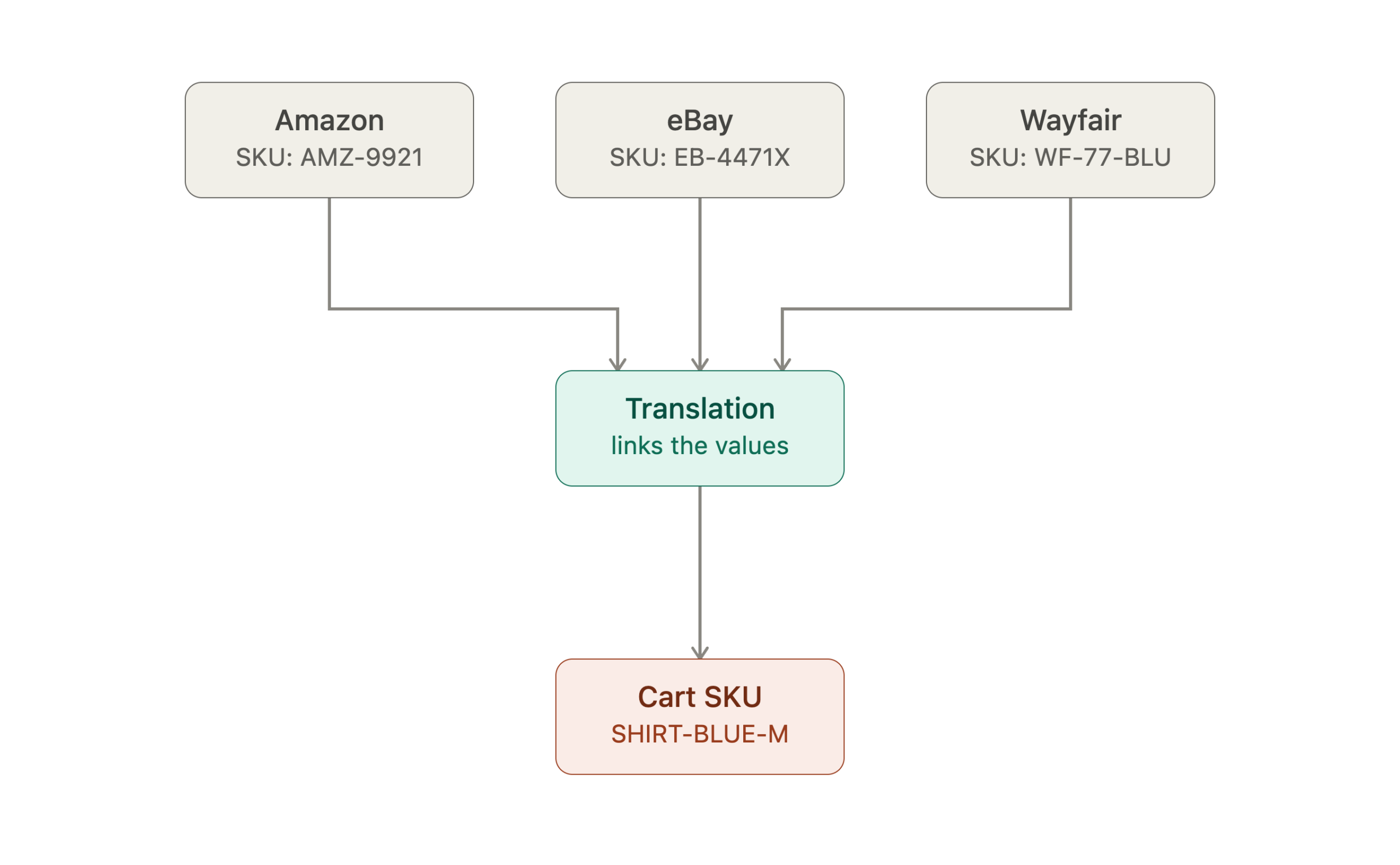
Think of it as a translation:
Marketplace SKU → Cart SKU
The marketplace might call a product ABC-123.
The merchant’s ecommerce platform might call that same product SHIRT-BLUE-M.
The values are different, but if the system knows that ABC-123 = SHIRT-BLUE-M, the two products can still be connected.
Here, the Cart SKU is simply the SKU used by the merchant’s ecommerce platform.
Why that connection matters
This relationship becomes particularly important when information needs to move between the marketplace and the merchant’s ecommerce platform.
Take an order.
A customer buys a product on a marketplace. The marketplace sends the order back, including the marketplace’s SKU.
ChannelUnity needs to know which product that SKU represents in the merchant’s cart.
If the relationship is known, the marketplace SKU can be translated to the corresponding Cart SKU and the order can be matched to the correct product.
If it isn’t, the automation has a problem.
And orders aren’t the only consideration.
The same product relationship can be important when information is moving in the other direction — for example, when updating stock, price or product data on marketplace listings.
Without a reliable connection between the marketplace listing and the corresponding product in the cart, systems can struggle to determine where that information belongs.
This is why SKU matching is much more than a tidy piece of catalogue administration.
It is part of the foundation that allows marketplace automation to work.
A simpler way to connect the dots
This is where ChannelUnity’s new SKU Translation tool comes in.
Now available directly within the ChannelUnity UI, SKU Translations allows customers to create a relationship between a marketplace Channel SKU and the corresponding Cart SKU.
So if a marketplace listing uses:
ABC-123
while the corresponding product in the cart uses:
SHIRT-BLUE-M
the user can create a translation telling ChannelUnity that these two values represent the same product.
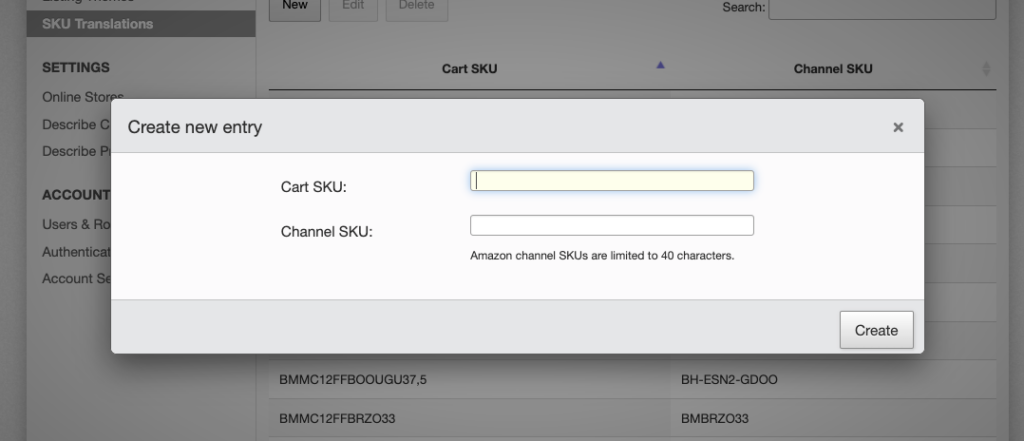
Image: ChannelUnity SKU Translation tool showing Channel SKU and Cart SKU mappings.
Once that relationship has been established, ChannelUnity can use it when processing information between the marketplace and the cart.
The tool also makes it possible to search for translations using either the Cart SKU or Channel SKU, edit existing translations and manage larger sets of translations through import and export.
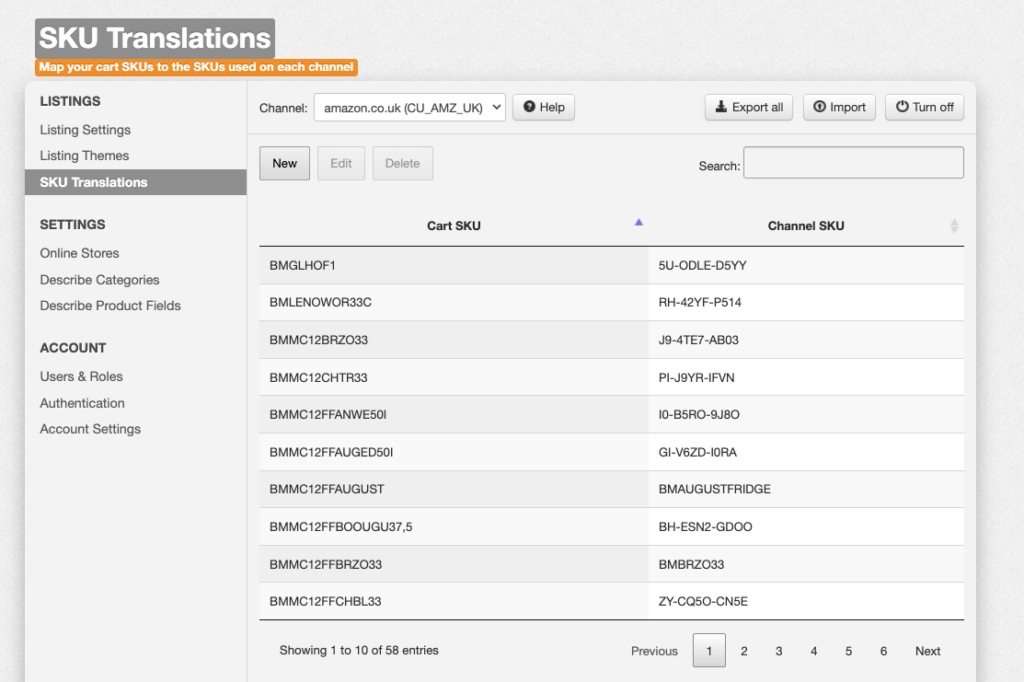
Image: ChannelUnity SKU Translation import and export functionality.
That means merchants don’t have to go back through their entire marketplace catalogue simply because the SKU structures they use today aren’t identical.
They can connect the products they already have.
The bigger picture
SKU management might not be the most exciting part of running an ecommerce business.
But it is a good example of something that is easy to overlook until it causes a problem.
Marketplace automation relies on systems being able to understand the relationships between products, listings, orders and inventory.
Sometimes those relationships are straightforward. Sometimes they are anything but.
And when a merchant has inherited marketplace data, changed platforms, uses different SKU conventions or doesn’t use SKUs in their cart at all, having a simple way to establish those relationships becomes incredibly valuable.
The goal isn’t necessarily to make every SKU the same.
It’s to make sure your systems know which products are the same.
Because when that connection is right, the automation built on top of it has a much stronger foundation.